
You load into a hotel ballroom with ceilings barely clearing nine feet, zero rigging points, and a client who booked the space for the chandeliers. Your job is to make 400 people hear a speech without a single feedback loop tearing their heads off.
Banquet halls are acoustic nightmares. They are concrete boxes dressed in drywall and glass. You rarely get the luxury of flying a line array to distribute sound evenly. You are stuck building a ground-supported system from the floor up.
Here is how you engineer a ground-supported sound system that survives the room, protects the mix, and keeps the audience focused on the stage.
The Work Starts Before Load-In
Hardware does not fix bad planning. The real work happens before you push the first flight case off the truck. I demand three things before show day:
- Room access timing: How early can we set up and ring out the room?
- Power mapping: Where are the isolated circuits? If you share a breaker with the caterer’s coffee urn, your PA system will drop offline exactly when they brew the decaf.
- The seating manifest: Ground-supported systems use point-source speakers. Each box covers a specific physical slice of the room. If you do not know exactly where the audience is sitting, you are guessing where to aim the sound.
One absolute rule governs my floor plans: Wire everything you can. Copper is a commitment; wireless is a convenience. Hard-lined signal and power do not fail. When a cable run creates a tripping hazard, I deploy battery-powered speakers. Anywhere a cable must cross a walking path, it goes under a rubber ramp or gets taped flat to the floor. An attendee tripping over an XLR cable will end your show faster than a blown amplifier.
Point the Energy Where the Story Is
Sound must originate from the visual source. Your main speakers belong at the stage line, angled outward to cover the audience.
This accomplishes two mechanical goals. First, it prevents cognitive dissonance. The audience’s eyes and ears lock onto the same physical location. Second, it kills feedback before it starts. By firing the speakers away from the presenter’s microphone, you prevent the microphone from picking up its own amplified signal and entering a runaway feedback loop.
Architecting Zones, Not Volume
The standard rookie mistake is placing two massive speakers at the front and cranking the output until the back row can hear. This deafens the front row and blasts acoustic energy off the back wall, turning the room into a wash of mud.
The solution is zoning. You break the room into physical grids and deploy quiet, targeted speakers for each block.
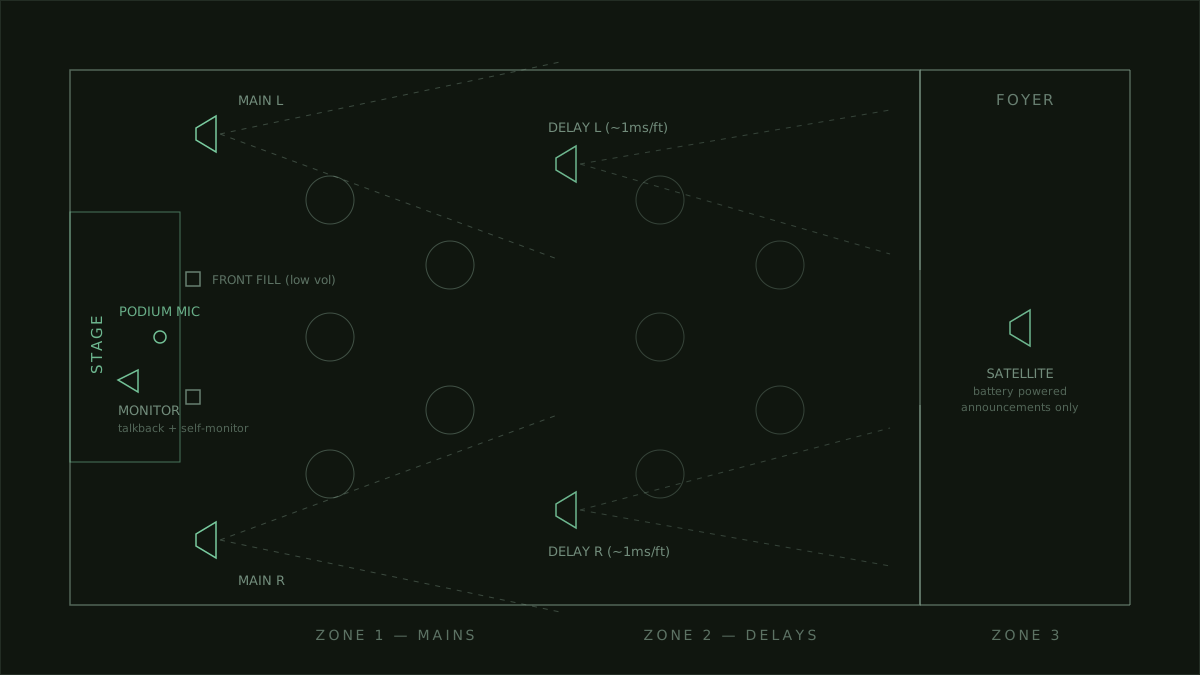 A typical ground-supported zoning layout: mains at the stage, delays mid-room, front fills at the lip, and a satellite in the foyer.
- Mains: Positioned at the stage. They cover the front and middle sections.
- Front Fills: Small boxes placed on the stage lip, aimed at the center VIP tables. They run at a much lower volume to fill the physical gap where the main speakers overshoot the front row.
- Delay Fills: Speakers placed halfway down the room to cover the rear section.
Delays require math. Sound travels through air at roughly one foot per millisecond. If you place a delay speaker 50 feet away from your mains and run them simultaneously, the audience in the back hears the delay speaker 50 milliseconds before the main speaker’s audio arrives. That creates a distinct, chaotic echo.
To fix this, you electronically delay the signal hitting the rear speakers. You hold the audio back by exactly 50 milliseconds. The sound from the mains and the sound from the delays hit the back row at the exact same instant. The speakers disappear, and the room sounds unified.
The Secret Weapon: The Stage Monitor
Corporate clients rarely ask for a stage monitor. They do not know what it is. I install one anyway. It is a speaker placed on the stage, pointed directly at the presenter.
It serves three functions:
- Confidence: Performers stay in time and on pitch when they can hear themselves.
- Video Playback: When a video rolls, the presenter hears the audio clearly, letting them time their re-entry.
- The God Mic: I route a private wireless microphone exclusively to the stage monitor. This gives the event coordinator a direct line to the presenter. They can say, “Stretch for two minutes, catering is behind,” without the audience hearing a word. It saves the program without breaking the illusion.
Wireless Strategy: Short Air, Long Copper
I love wireless microphones. I do not trust them. Wi-Fi routers, LED video walls, and neighboring events crowd the RF spectrum and cause dropouts.
To guarantee stability, I treat wireless links like short patch cables. Do not put the wireless receiver at the back of the room at the mix position. Place the receiver directly under the stage. The radio wave only travels ten feet. From the receiver, the audio travels down a hard-wired copper snake all the way back to the soundboard. Short air, long copper.
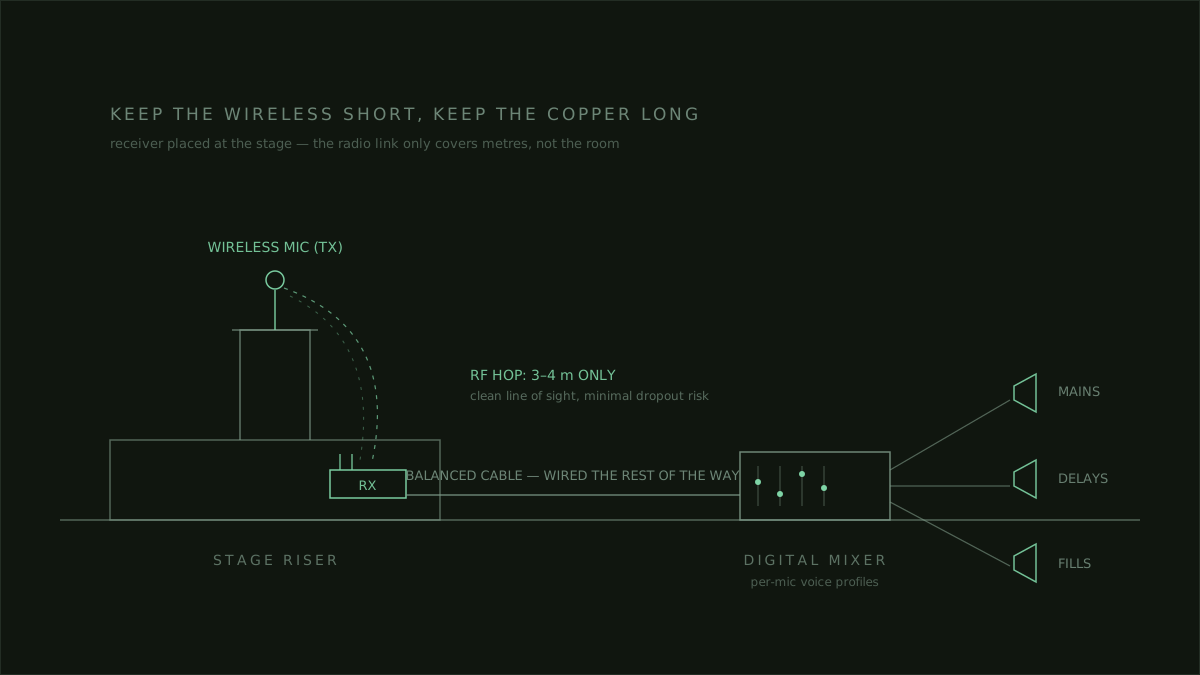 Keep the wireless short and the copper long: the receiver lives at the stage, not at the mix position.
Distinct Voices Require Distinct Profiles
A premium show treats every voice individually. Do not route five presenters through a single generic vocal preset. People speak differently. Some project from the chest; others whisper. Some hold the microphone against their chin; others hold it at their waist.
Assign every presenter their own microphone, marked with colored tape. Build a specific EQ and compression profile for that exact person. When they step to the podium, their voice hits the room perfectly tuned. It requires effort, but it separates a functional show from a flawless one.
Cover the Exits
One of the most effective upgrades costs you nothing but a single battery-powered speaker. Place a satellite speaker in the foyer or lobby.
Do not send the full mix to this speaker. Send only the performances and the housekeeping announcements. When you announce that dinner is served, the people who need to hear it are not in the ballroom. They are in the lobby. Pushing that announcement to a dedicated foyer zone pulls the crowd back into the room on schedule.
The System Should Disappear
Technology exists to solve problems. It is not there to be noticed. The zones, the delays, the private talkback channels—they all stem from understanding the client’s timeline and anxieties.
Get the floor plan. Hardwire everything you can. Zone the room. Calculate your delays. EQ the microphones. Then get out of the way. The gear serves the event. Never the other way around.
Until the next load-in,
— Akeel